


My Process
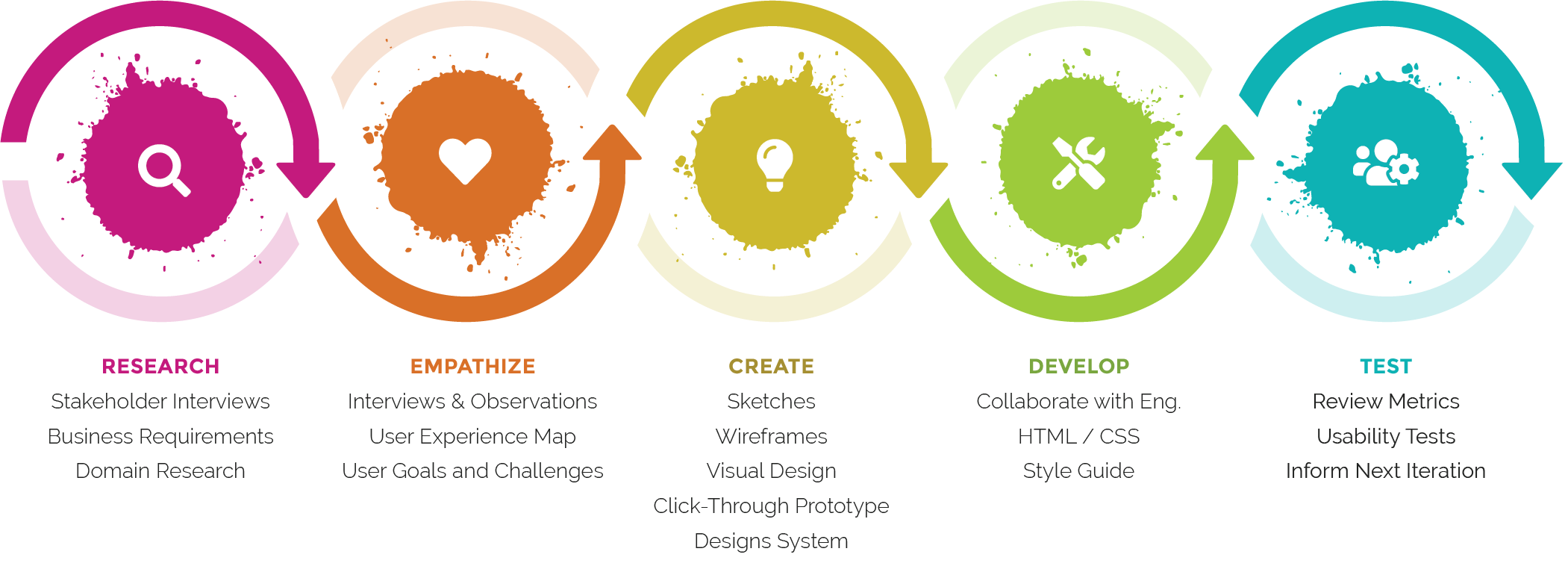
1. Discovery & Alignment
I begin every project by aligning with stakeholders and immersing myself in the business context. My aim is to understand goals, constraints, success metrics, and what prompted the need for change.Typical questions include:
- What problems and goals does the product address?
- How do users currently accomplish these tasks?
- Where are the business and user pain points?
- Which metrics matter most?
- Why now?
AI-supported summaries of stakeholder interviews and market insights help speed up this phase without sacrificing depth.
2. Research & Insight Generation
I combine traditional research with AI-accelerated analysis:
- Product audits (especially for redesigns) to identify gaps and opportunities.
- User observation and interviews, often supplemented with AI-assisted note-taking and pattern detection.
- Behavioral data review to surface friction points.
Watching users interact with a product—even remotely—remains invaluable. Small signals like hesitation, repeated scrolling, or confusion often reveal the core issues.
3. Ideation & Concept Exploration
I prefer collaborative, fast-paced idea generation:
- Sketching multiple directions quickly
- Running team brainstorms
- Using AI tools to generate alternative concepts, edge cases, and content variations
This helps us explore broadly before narrowing in. I share early thinking often to keep alignment tight.
4. Interaction Design
Depending on scope, I map flows with low- to mid-fidelity wireframes to test structure and logic quickly. Sharing early drafts is part of my rhythm—it reduces surprises and invites better decisions.
5. Visual Design & Prototyping
I use Figma for high-fidelity design, systems work, and interactive prototypes.
As a visual designer at heart, I obsess (productively) over type, spacing, motion, color, and language. My values: simplicity, clarity, and a user-first mindset.
6. Implementation Collaboration
Once engineering begins, I partner closely with developers to ensure the design is implemented as intended. I’m comfortable jumping into the code to adjust spacing or colors when it streamlines the process. Quick design-to-dev loops are essential.
7. Launch, Measure, Iterate
A launch is a milestone—not the finish line. Post-release, I look at:
- Qualitative feedback (interviews, support logs, user sessions)
- Quantitative signals (behavioral data, conversion, retention, task success)
- AI-generated insights that highlight patterns we may miss manually
These inputs shape continuous improvements and confirm whether the design truly solved the problems we set out to address.
“If we want users to like our software we should design it to behave like a likable person: respectful, generous, and helpful.” — Alan Cooper
If you would like to chat
contact me on linkedin


My Process
1. Discovery & Alignment
I begin every project by aligning with stakeholders and immersing myself in the business context. My aim is to understand goals, constraints, success metrics, and what prompted the need for change.Typical questions include:
- What problems and goals does the product address?
- How do users currently accomplish these tasks?
- Where are the business and user pain points?
- Which metrics matter most?
- Why now?
AI-supported summaries of stakeholder interviews and market insights help speed up this phase without sacrificing depth.
“If we want users to like our software we should design it to behave like a likable person: respectful, generous, and helpful.” — Alan Cooper
2. Research & Insight Generation
I combine traditional research with AI-accelerated analysis:
- Product audits (especially for redesigns) to identify gaps and opportunities.
- User observation and interviews, often supplemented with AI-assisted note-taking and pattern detection.
- Behavioral data review to surface friction points.
Watching users interact with a product—even remotely—remains invaluable. Small signals like hesitation, repeated scrolling, or confusion often reveal the core issues.
3. Ideation & Concept Exploration
I prefer collaborative, fast-paced idea generation:
- Sketching multiple directions quickly
- Running team brainstorms
- Using AI tools to generate alternative concepts, edge cases, and content variations
This helps us explore broadly before narrowing in. I share early thinking often to keep alignment tight.
4. Interaction Design
Depending on scope, I map flows with low- to mid-fidelity wireframes to test structure and logic quickly. Sharing early drafts is part of my rhythm—it reduces surprises and invites better decisions.
5. Visual Design & Prototyping
I use Figma for high-fidelity design, systems work, and interactive prototypes. As a visual designer at heart, I obsess (productively) over type, spacing, motion, color, and language. My values: simplicity, clarity, and a user-first mindset.
6. Implementation Collaboration
Once engineering begins, I partner closely with developers to ensure the design is implemented as intended. I’m comfortable jumping into the code to adjust spacing or colors when it streamlines the process. Quick design-to-dev loops are essential.
7. Launch, Measure, Iterate
A launch is a milestone—not the finish line. Post-release, I look at:
- Qualitative feedback (interviews, support logs, user sessions)
- Quantitative signals (behavioral data, conversion, retention, task success)
- AI-generated insights that highlight patterns we may miss manually
These inputs shape continuous improvements and confirm whether the design truly solved the problems we set out to address.
If you would like to chat
contact me on linkedin


My Process
1. Discovery & Alignment
I begin every project by aligning with stakeholders and immersing myself in the business context. My aim is to understand goals, constraints, success metrics, and what prompted the need for change. Typical questions include:
- What problems and goals does the product address?
- How do users currently accomplish these tasks?
- Where are the business and user pain points?
- Which metrics matter most?
- Why now?
AI-supported summaries of stakeholder interviews and market insights help speed up this phase without sacrificing depth.
2. Research & Insight Generation
I combine traditional research with AI-accelerated analysis:
- Product audits (especially for redesigns) to identify gaps and opportunities.
- User observation and interviews, often supplemented with AI-assisted note-taking and pattern detection.
- Behavioral data review to surface friction points.
Watching users interact with a product—even remotely—remains invaluable. Small signals like hesitation, repeated scrolling, or confusion often reveal the core issues.
3. Ideation & Concept Exploration
I prefer collaborative, fast-paced idea generation:
- Sketching multiple directions quickly while Using AI tools to generate alternative concepts
- Running team brainstorms
This helps us explore broadly before narrowing in. I share early thinking often to keep alignment tight.
4. Interaction Design
Depending on scope, I map flows with low- to mid-fidelity wireframes to test structure and logic quickly. Sharing early drafts is part of my rhythm—it reduces surprises and invites better decisions.
5. Visual Design & Prototyping
I use Figma for high-fidelity design, systems work, and interactive prototypes.
As a visual designer at heart, I obsess (productively) over type, spacing, motion, color, and language. My values: simplicity, clarity, and a user-first mindset.
6. Implementation Collaboration
Once engineering begins, I partner closely with developers to ensure the design is implemented as intended. I’m comfortable jumping into the code to adjust spacing or colors when it streamlines the process. Quick design-to-dev loops are essential.
7. Launch, Measure, Iterate
A launch is a milestone—not the finish line. Post-release, I look at:
- Qualitative feedback (interviews, support logs, user sessions)
- Quantitative signals (behavioral data, conversion, retention, task success)
- AI-generated insights that highlight patterns we may miss manually
These inputs shape continuous improvements and confirm whether the design truly solved the problems we set out to address.
“If we want users to like our software we should design it to behave like a likable person: respectful, generous, and helpful.” — Alan Cooper
If you would like to chat
contact me on linkedin