


Our sales team was happy! Districts were excited when we shared early concepts. Finally, a platform that gave teachers and admins what they needed!
Company
Collaborative Classroom
Sector
Education
Vertical(s)
K–12 Curriculum & Instruction
Project
Administrator & Teacher Platform
My Role
Principal UX Designer
Partners
PM, Head of Implementation, Developers
Disciplines
Design Strategy, UX Design, UI Design, Design Systems, Information Architecture, User Research, Rapid Prototyping
Context and Challenge
Our existing resources (CVPro for educators, OrgAdmin for district admins) had outgrown the needs of our customers. The platform lacked customization, some features felt complex and hard to use, and the look and feel was uninspiring. While we also offered a rich library of resources, it was not easy to find “in the moment” content. Search was broken, browsing was overwhelming.
User Research
I led a cross-functional team to deeply understand the needs of teachers and admins. We interviewed 20+ users, talked to internal stakeholders (sales and implementation team) and watched teachers in the classroom. Those learnings led to themes and features that created the foundation of the new platform.Through mindmaps, user journeys, and cross-functional card sorting exercises, themes started to emerge.
Learning Portal 2.0
Our goal was an easy to use, customizable platform for both teachers and admins. It would provide them with the resources they need at any given time. It would recognize where they are in their journey. A mobile version would provide in-the moment support.The team was excited about creating a new and better experience, but we had limited resources and time. In close collaboration with the engineering team, we came up with a phased approach:
- Reskin the existing suite of products, make it feel cohesive and on brand.
- Visual design refresh of the Learning Portal.
- Full integration of the AI Chatbot.
Future VisionPlatform Suite for Teachers and Admins
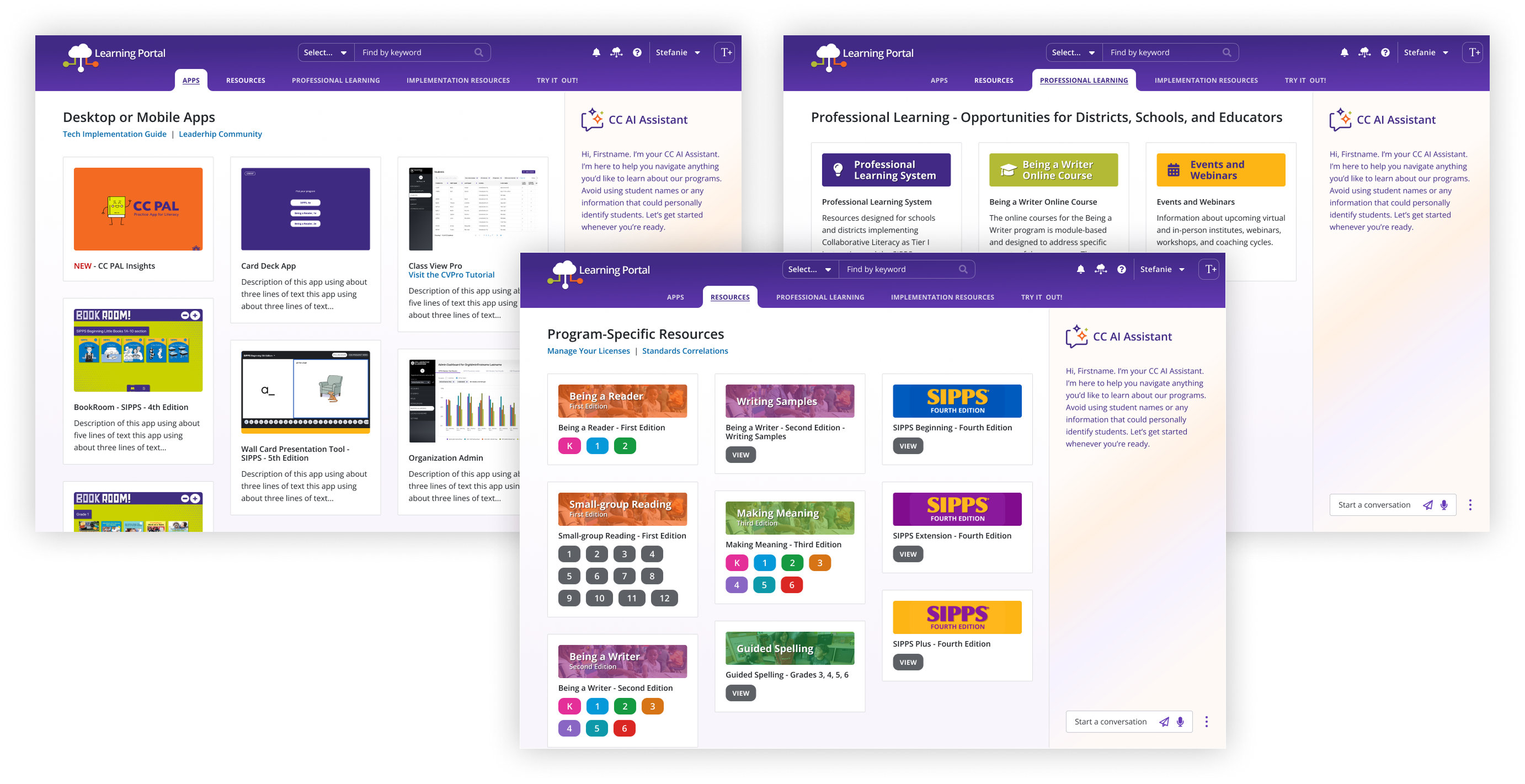

Parallel Development
In addition to designing the new platform, we worked with an external partner to build just-in-time AI-powered functionality. The first iteration was a chatbot. We named her CeCe. Eventually, CeCe’s AI functionality would be deeply integrated in the platform. We thoroughly tested and iterated on the content and made sure that safety guardrails were in place. We were cautious about how our customers might feel about the use of AI. Ongoing user interviews were part of our process.

beta

Based on over 5000 articles I read, I can guide you and help with program implementation, planning ahead, or challenges in your classes and groups. What best describes your need?
BR Grade 2 Program
Other Program
Student Assessments
Student Support
Implementation Guidance
Technical Issue
Ask a question

Impact
Stakeholders loved the fresh design! Our sales team was enthusiastic! The districts were excited when they saw the new prototype. Everyone was looking forward to launching a lightweight, user-friendly, and fun platform.
I was initially worried about getting push-back from the engineers. They are a small team, and always short on resources. But they were just as excited! They appreciated that I took implementation challenges into consideration and came up with a strategy showing quick progress.
If you would like to chat
contact me on linkedin


Company
Collaborative Classroom
Sector
Education
Vertical(s)
K–12 Curriculum & Instruction
Project
Administrator & Teacher Platform
My Role
Principal UX Designer
Partners
PM, Head of Implementation, Developers
Disciplines
Design Strategy, UX Design, UI Design, Design Systems, Information Architecture, User Research, Rapid Prototyping
Our sales team was happy! Districts were excited when we shared early concepts. Finally, a platform that gave teachers and admins what they needed!
Context and Challenge
Our existing resources (CVPro for educators, OrgAdmin for district admins) had outgrown the needs of our customers. The platform lacked customization, some features felt complex and hard to use, and the look and feel was uninspiring. While we also offered a rich library of resources, it was not easy to find “in the moment” content. Search was broken, browsing was overwhelming.
User Research
I led a cross-functional team to deeply understand the needs of teachers and admins. We interviewed 20+ users, talked to internal stakeholders (sales and implementation team) and watched teachers in the classroom. Those learnings led to themes and features that created the foundation of the new platform.Through mindmaps, user journeys, and cross-functional card sorting exercises, themes started to emerge.
Learning Portal 2.0
Our goal was an easy to use, customizable platform for both teachers and admins. It would provide them with the resources they need at any given time. It would recognize where they are in their journey. A mobile version would provide in-the moment support.The team was excited about creating a new and better experience, but we had limited resources and time. In close collaboration with the engineering team, we came up with a phased approach:
- Reskin the existing suite of products, make it feel cohesive and on brand.
- Visual design refresh of the Learning Portal.
- Full integration of the AI Chatbot.
Future VisionPlatform Suite for Teachers and Admins
Parallel Development
In addition to designing the new platform, we worked with an external partner to build just-in-time AI-powered functionality. The first iteration was a chatbot. We named her CeCe. Eventually, CeCe’s AI functionality would be deeply integrated in the platform. We thoroughly tested and iterated on the content and made sure that safety guardrails were in place. We were cautious about how our customers might feel about the use of AI. Ongoing user interviews were part of our process.

beta
Based on over 5000 articles I read, I can guide you and help with program implementation, planning ahead, or challenges in your classes and groups. What best describes your need?
BR Grade 2 Program
Other Program
Student Assessments
Student Support
Implementation Guidance
Technical Issue
Ask a question
Impact
Stakeholders loved the fresh design! Our sales team was enthusiastic! The districts were excited when they saw the new prototype. Everyone was looking forward to launching a lightweight, user-friendly, and fun platform.
I was initially worried about getting push-back from the engineers. They are a small team, and always short on resources. But they were just as excited! They appreciated that I took implementation challenges into consideration and came up with a strategy showing quick progress.
If you would like to chat
contact me on linkedin


Company
Collaborative Classroom
Sector
Education
Vertical(s)
K–12 Curriculum & Instruction
Project
Administrator & Teacher Platform
My Role
Principal UX Designer
Partners
PM, Head of Implementation, Developers
Disciplines
Information Architecture, User Research, Design Strategy, Design Systems, UX Design, UI Design, Accessibility, Rapid Prototyping, Cross-Functional Collaboration
Our sales team was happy! Districts were excited when we shared early concepts. Finally, a platform that gave teachers and admins what they needed!
Context and Challenge
Our existing resources (CVPro for educators, OrgAdmin for district admins) had outgrown the needs of our customers. The platform lacked customization, some features felt complex and hard to use, and the look and feel was uninspiring. While we also offered a rich library of resources, it was not easy to find “in the moment” content. Search was broken, browsing was overwhelming.
User Research
I led a cross-functional team to deeply understand the needs of teachers and admins. We interviewed 20+ users, talked to internal stakeholders (sales and implementation team) and watched teachers in the classroom. Those learnings led to themes and features that created the foundation of the new platform.Through mindmaps, user journeys, and cross-functional card sorting exercises, themes started to emerge.
Learning Portal 2.0
Our goal was an easy to use, customizable platform for both teachers and admins. It would provide them with the resources they need at any given time. It would recognize where they are in their journey. A mobile version would provide in-the moment support.The team was excited about creating a new and better experience, but we had limited resources and time. In close collaboration with the engineering team, we came up with a phased approach:
- Reskin the existing suite of products, make it feel cohesive and on brand.
- Visual design refresh of the Learning Portal.
- Full integration of the AI Chatbot.
Future VisionPlatform Suite for Teachers and Admins
Parallel Development
In addition to designing the new platform, we worked with an external partner to build just-in-time AI-powered functionality. The first iteration was a chatbot. We named her CeCe. Eventually, CeCe’s AI functionality would be deeply integrated in the platform. We thoroughly tested and iterated on the content and made sure that safety guardrails were in place. We were cautious about how our customers might feel about the use of AI. Ongoing user interviews were part of our process.
beta
Based on over 5000 articles I read, I can guide you and help with program implementation, planning ahead, or challenges in your classes and groups. What best describes your need?
BR Grade 2 Program
Other Program
Student Assessments
Student Support
Implementation Guidance
Technical Issue
Ask a question
Impact
Stakeholders loved the fresh design! Our sales team was enthusiastic! The districts were excited when they saw the new prototype. Everyone was looking forward to launching a lightweight, user-friendly, and fun platform.
I was initially worried about getting push-back from the engineers. They are a small team, and always short on resources. But they were just as excited! They appreciated that I took implementation challenges into consideration and came up with a strategy showing quick progress.
If you would like to chat
contact me on linkedin